
IT Best Practices: Improving Client Stability with Proactive Problem Management
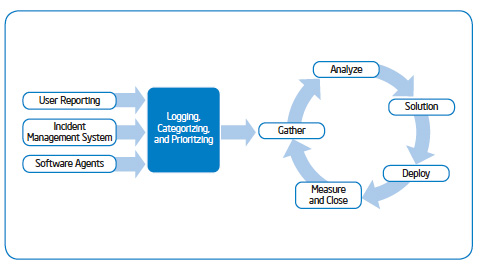
Image for FaceBook
Download PDFRead/Download White Paper (PDF)
For more information on Intel IT best practices, please visit www.intel.com/IT
 

IT Best Practices: Intel IT implemented a proactive problem management process based on analysis of objective, largely system-generated data from client PCs across our worldwide environment. Using this approach, we have increased client stability by reducing the number of blue screen system crashes by more than 50 percent, and we are beginning to realize benefits in other areas including application crashes. Our data analysis enables us to identify users who are experiencing the most problems, even when they have not reported them; we proactively approach them and offer to fix their problems. Users have responded very positively to this. We are addressing other areas, including monitoring hard drives to detect problems before catastrophic failure; this helps us avoid the loss of data, increases employee productivity, and saves money because hard drives that are still under warranty are replaced at no cost to Intel.

For more on IT Best Practices, visit IT@Intel

Share

Related posts:

  1. Inside IT: Improving Client Stability IT Best Practices: Episode 20 – Blue screens have been around for about as long as there have been PCs. They’re a major challenge for an organization, and they can significantly reduce productivity.. In spite of that, not enough has...
  2. IT Best Practices: Validating the Reliability of Intel Solid-State Drives IT Best Practices: In a year long study of more than 45,000 SSDs deployed in our mobile business PC fleet, we validated that Intel Solid-State Drives provide an 87 percent reduction in the annualized failure rate compared to hard disk...
  3. IT Best Practices: Evolving Centralized IT Client Management IT Best Practices: Intel IT continues to proactively improve automation, consistency, and cost efficiency. Refining centralized IT services, Intel IT continues to look at ways to control software proliferation, manage hardware, enhance mobility, and reduce costs. ...
  4. IT Best Practices: Improve service and lower TCO – Proactive PC Support Improves Service and Lowers TCO IT Best Practices: As part of our online support strategy, Intel IT developed a self-service PC Health Check utility to deliver better customer support, improve response time, and increase employee satisfaction—while reducing operating costs. PC Health Check empowers employees to...
  5. Evaluating Thin-Client IT Security in a Changing Threat Landscape IT Client Technology: Intel IT’s security team continually analyzes our computing model to determine how it needs to evolve in response to an ever-changing threat landscape. Recent cyber-attacks on a number of high-profile targets provided added impetus to re-evaluate the...

Posted in: Information Technology, Intel, Intel IT, IT White Papers, IT@Intel
Tags: , , , , , , , , ,

*